Veo 4 Release Date: What Google Confirmed
No official Veo 4 release date has been confirmed. See what Google announced at I/O 2026, why Veo 3.1 is still current, and what to use now.
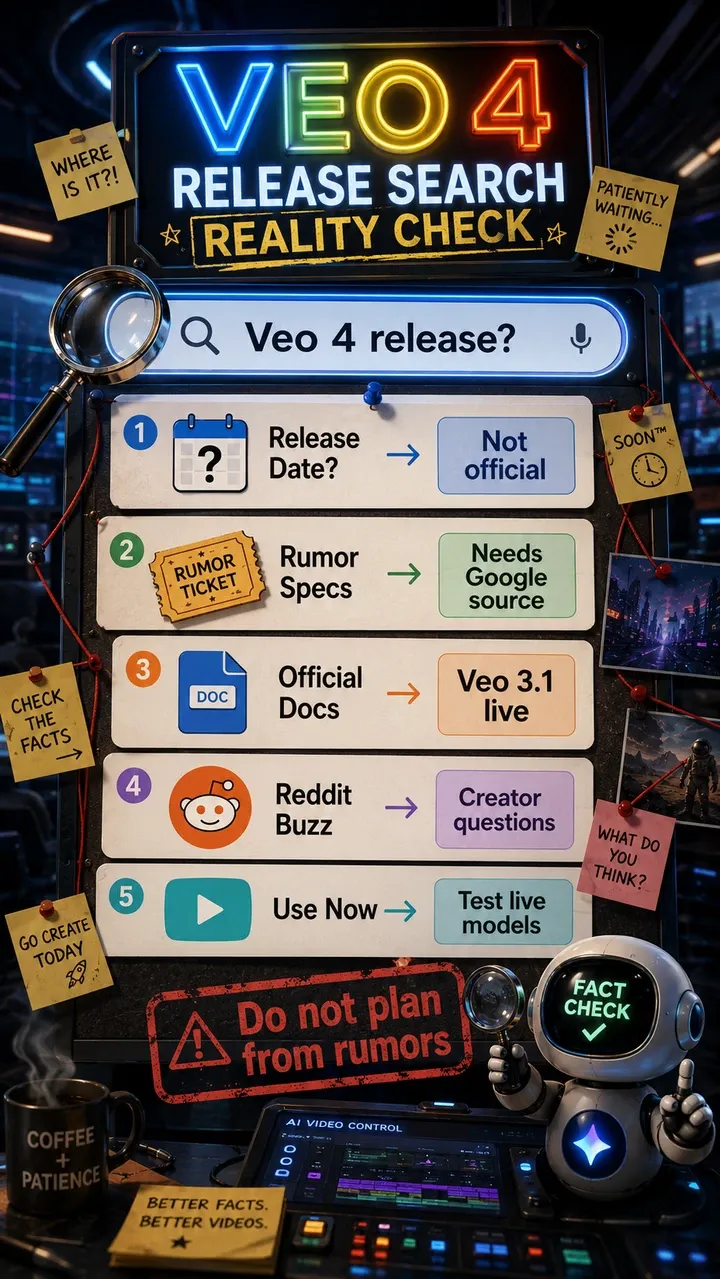
AI video creators are asking a simple question: what is the Veo 4 release date? As of May 22, 2026, Google has not announced an official Veo 4 release date, public model page, API model ID, model card, or pricing page.
Google did announce a major new video-related model at Google I/O 2026, but the official name was Gemini Omni Flash, not Veo 4. Google’s official Veo pages still point to Veo 3.1 as the current Veo line, and the public developer docs reviewed for this update do not list a Veo 4 route.
Last checked against Google DeepMind, Google Cloud, and Gemini API documentation on May 22, 2026. This article focuses on the naming problem around “Veo 4,” what Google has actually documented, and what creators can use while waiting for the next official Veo update.
Current Veo 4 Status
Here is the practical status for searches such as veo 4, veo4, google veo 4, and veo 4 release date.
| Question | Current answer |
|---|---|
| Official release date | Not confirmed by Google. |
| Latest documented Veo line | Veo 3.1. |
| Google I/O 2026 video announcement | Gemini Omni Flash, a separate Gemini-family model. |
| Veo 4 model ID or API route | Not listed in the official docs reviewed for this update. |
| What to use now | Veo 3.1, Gemini Omni where available, and live PixVerse video workflows. |
If you want the Omni model details, prompt guide, and test prompts, read our dedicated Omni review. If you need production today, PixVerse can help test live video models while Veo 4 remains unconfirmed.
What Google Has Confirmed So Far
Veo 4 Release Date: What Is Confirmed
The release-date answer is still no: Google has not published an official Veo 4 release page, launch date, model card, public API model ID, or pricing page. “Veo 4” is best treated as a search and community shorthand for the next expected Veo generation.
That does not mean the topic is useless. It means the article needs clean labels. Veo is Google’s specialized video generation model line. Omni is a Gemini-native multimodal creation and conversational editing family. The two may overlap in creator expectations, but Google has not said they are the same thing.
For production, the practical answer is to keep using documented tools. Veo 3.1 Standard and Veo 3.1 Fast are already available on PixVerse, and PixVerse V6 remains useful when you need accessible text-to-video, image-to-video, audio, transition, extension, and API workflows.
Veo 3.1 vs Gemini Omni vs Veo 4
Creators are mixing these terms because they all point to Google’s video future. They are not interchangeable.
| Term | What It Means Today | Official Status |
|---|---|---|
| Veo | Google’s specialized video generation model line for cinematic video with audio | Official |
| Veo 3.1 | The current documented Veo line across Google DeepMind, Gemini API, and Google Cloud surfaces | Official |
| Gemini Omni Flash | A Gemini-family model for mixed-input video creation and conversational editing | Official |
| Veo 4 | A common search term and community phrase for Google’s expected next Veo generation | Not officially confirmed |
This naming map is the main point of the page. A reader can search for “Veo 4 release” and still leave with the right mental model: Veo 4 is a watch term, not a confirmed product name.
What Google Has Confirmed About Veo 3.1
Google has confirmed a lot about Veo, just not a public Veo 4 release.
The Google DeepMind Veo page still presents Veo 3.1 as the current Veo model. The Gemini API video docs list veo-3.1-generate-preview, veo-3.1-fast-generate-preview, and veo-3.1-lite-generate-preview. The Google Cloud Veo 3.1 documentation lists veo-3.1-generate-001, veo-3.1-fast-generate-001, and veo-3.1-lite-generate-001.
Those docs also matter because they show what teams can plan around today: 4, 6, or 8 second generation lengths in documented Veo 3.1 routes; 720p and 1080p output; and 4K support or pricing in specific Veo 3.1 documentation with route-specific availability. None of that should be relabeled as Veo 4. It belongs to the documented Veo 3.1 line.
The missing pieces are just as important. There is no official Veo 4 model card, pricing table, API model ID, release page, or launch note in the official sources reviewed for this update.
What Google Announced Instead at I/O 2026
At Google I/O 2026, the video announcement was Gemini Omni Flash. That matters because it gives Google a new video creation and editing surface inside the Gemini family. Google’s official announcement describes mixed inputs, video-first creation, world-knowledge grounding, and conversational editing. The model card describes text, image, audio, and video inputs with high-resolution video and audio output.
That explains why people are asking whether Omni is what they expected Veo 4 to be. But the safer answer is still no: Google has not called Omni Flash “Veo 4,” and it has not said Omni replaces Veo.
The clean division is useful for readers. Our Omni article covers the new Gemini model and prompt workflow. This page covers the Veo release question: whether “Veo 4” is official, what current Veo docs say, and how to avoid planning around unsupported specs.
How to Evaluate Veo 4 Claims
How to Spot Fake Veo 4 Claims
The current Veo 4 search landscape has a trust problem. Some pages brand themselves as “Veo 4 AI Video Generator,” “Veo 4 online,” or “Free Google Veo 4” before Google has published an official Veo 4 model page. Others mention launch windows, longer clips, storyboards, avatars, native 4K, or API access without anchoring those claims to a Google source.

Use a simple rule: if a claim affects production planning, wait for an official source. A real Veo 4 launch should come with some combination of a Google announcement, model page, API model ID, pricing, region support, usage limits, and model card. A Reddit thread, roundup, or third-party generator page can show creator interest, but it should not be treated as documentation.
Before trusting a Veo 4 page, check whether it includes:
- A Google, Google DeepMind, Google AI, Gemini API, or Google Cloud source.
- A public model ID, not only marketing copy.
- Pricing, quota, region, and access information from an official page.
- A model card or technical documentation.
- Clear separation between Veo 3.1 features and unconfirmed Veo 4 claims.
Common rumor areas are still worth watching. Longer native clips would reduce stitching. Better identity consistency would help narrative video. Stronger camera control would make dolly, orbit, rack focus, and handheld instructions more reliable. Improved audio sync would matter for dialogue and social ads. Those are sensible expectations for a next-generation model, not confirmed Veo 4 specs.
One current claim should be rejected outright: Veo 4 is not available on PixVerse today. PixVerse currently gives creators access to documented, live workflows, including Veo 3.1 options and PixVerse’s own video models.
Before Changing a Roadmap for Veo 4
When Google makes the next official Veo move, check for these items before changing a roadmap:
- Official model name and model page.
- Public API model ID.
- Duration, resolution, and audio limits.
- Input support for text, image, first/last frame, references, or video.
- Pricing, quotas, regions, and access tiers.
- Safety, watermarking, and commercial-use details.
- Real tests against your own prompt set.
Until those details exist, “Veo 4 release” should remain a monitoring topic, not a production dependency.
What to Use While Waiting for Veo 4
Do not pause production for a model name Google has not confirmed. If you need publishable video this week, use live models and keep “Veo 4” on a watchlist.
If you need production today, PixVerse can help test live models such as Veo 3.1 options and PixVerse V6 while Veo 4 remains unconfirmed. That is especially useful when your real question is not “what will Google release later?” but “what model can produce the best result for this brief now?”
If you are already building around Google Cloud, keep the model name configurable so a future Veo route can be tested later. If you want Gemini-native conversational video editing, test Omni Flash where your account has access. If you need longer clips, multi-shot production, or model comparison in one place, test current PixVerse workflows with the same creative brief.
This is where a multi-model workflow is healthier than waiting for one release to solve everything. Run the same prompt across Veo 3.1, PixVerse V6, Seedance, Kling, Runway, Sora, and any other model you use. Compare the output by motion, subject stability, audio sync, prompt adherence, text rendering, and regeneration cost. That benchmark will still be useful if Google later ships a model officially named Veo 4.
For broader comparisons, see our Sora vs Veo vs PixVerse AI video guide and our text-to-video AI generator comparison.
FAQ
Is Veo 4 officially released?
No. As of May 22, 2026, Google has not officially released a public model called Veo 4. Official Google sources reviewed for this update point to Veo 3.1 and Gemini Omni Flash, not a Veo 4 model page.
Is Veo 4 the official name?
Not currently. “Veo 4” is a common search term and community label for the expected next Veo generation. It becomes official only if Google publishes it as a model name.
Is Gemini Omni the same as Veo 4?
No official source says Gemini Omni is Veo 4. Gemini Omni Flash is official and overlaps with some capabilities people expected from a next Google video model, especially mixed inputs and conversational editing. But Google presents Gemini Omni as a Gemini model family and Veo as its specialized video model line.
What is the latest official Veo model?
Google’s public Veo pages and docs still point to Veo 3.1 as the current Veo line. Google Cloud also lists Veo 3.1 Standard, Fast, and Lite routes.
Does Veo 3.1 support 4K?
Some current Google Cloud and Gemini API pricing documentation includes 4K support or pricing for Veo 3.1 Standard and Fast, with route-specific availability and preview notes. Do not treat that as a Veo 4 feature.
What can I use before Veo 4 is official?
You can use current AI video tools such as Veo 3.1, PixVerse V6, Omni Flash where available, Seedance, Kling, Runway, Sora, and other live models depending on the project. PixVerse is useful when you want to test multiple models and keep production moving from one workspace.
Conclusion
The Veo 4 release is worth watching because it captures a real creator question: when will Google’s next specialized video model improve duration, consistency, control, pricing, and production workflow? But the name itself is not official today.
As of May 22, 2026, the clean answer is: Veo 3.1 is the documented Veo line, Omni Flash is a separate Gemini-native video creation and editing model, and “Veo 4” remains a release-watch keyword. Keep tracking official Google sources, label rumors clearly, and keep testing live models so your workflow does not depend on a name that Google has not confirmed.